 English
 русский
 عربى
عربى Español
Over time, a fan starts to behave differently. Airflow weakens, odd sounds appear or the equipment draws more energy than it used to. These changes creep in slowly, so they're easy to miss during routine operation. 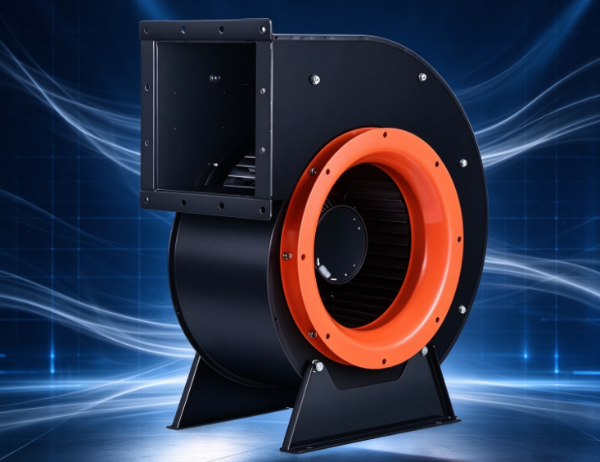 Spotting early warning signs lets maintenance teams investigate before production suffers or connected equipment gets damaged. It also helps users decide whether a fan needs cleaning, adjustment, repair or replacement.
Understanding common performance problems starts with watching how the equipment behaves under normal operating conditions.
What Are the Common Signs of AC Centrifugal Fan Performance Problems?
A centrifugal fan rarely loses performance without some visible change. Warning signs usually show up in everyday operation, not as a sudden breakdown.
Reduced airflow is a common concern. A ventilation system takes longer to clear warm air, equipment runs hotter than usual or certain areas get less ventilation. These changes point to a fan problem, though restrictions elsewhere in the system produce similar symptoms.
Noise and vibration reveal developing faults too. A fan that once ran quietly starts rattling, humming, scraping or making irregular sounds. The cause could be loose components, built-up dirt, worn bearings or contact between moving and stationary parts.
Operating temperature deserves attention as well. A motor that feels unusually hot, repeated protective shutdowns or a clear change in energy use signal an electrical or mechanical issue.
Common warning signs include:
- Weaker airflow from the outlet.
- Unusual noise during operation.
- Increased vibration or visible movement.
- Motor overheating or repeated shutdowns.
- Inconsistent airflow throughout the connected system.
- Longer operating periods to achieve the same ventilation effect.
- Unusual smells or visible signs of damage.
One symptom doesn't always pin down a specific fault. Weak airflow, for example, comes from a dirty impeller, a blocked inlet, an obstructed duct or an unsuitable operating setup. The best approach is to compare several observations and examine the system as a whole.
Why Does an AC Centrifugal Fan Deliver Less Airflow?
Reduced airflow hurts ventilation quality, equipment cooling and the performance of connected processes. It's also the most common reason users start investigating a centrifugal fan.
Dirt buildup is one cause. Dust, fibers, grease and other particles collect on the impeller and inside the housing. The buildup gets in the way of air movement and adds load to the rotating components. Dusty or oily air means more frequent inspection.
Blocked air passages are another. Filters clog, dampers fail to open fully and ducts collect debris. Even a fan in good condition can't move air properly through a restricted system.
The installation arrangement matters too. Poorly positioned inlet or outlet connections disrupt airflow. Sharp duct transitions, unsuitable fittings or changes to the ventilation layout alter how air enters and leaves the fan.
A useful inspection covers the whole airflow path. Don't focus only on the fan housing.
Check that filters are clean and dampers move freely. Look for visible obstructions around the inlet and outlet. Inspect accessible duct sections for accumulated material or damage. Compare current operating conditions with the system's normal behavior.
If airflow stays weak after you've cleared the obvious restrictions, qualified maintenance personnel need to examine the impeller, motor and other internal components.
Don't change operating settings without understanding the system requirements. An adjustment that boosts airflow in one area creates unwanted pressure changes elsewhere. Correct diagnosis prevents needless modifications.
What Causes Unusual Noise or Excessive Vibration?
A change in sound is an early clue that an AC centrifugal fan needs attention. Different faults make similar noises, though, so treat the sound as a warning. It isn't a definite diagnosis.
Loose mounting hardware causes rattling or shaking. As fasteners work loose during operation, the fan becomes less stable. Supporting structures and connected ductwork also carry vibration, so a problem seems to come from the fan when the real source sits nearby.
Uneven dirt on the impeller upsets its balance and creates vibration as the fan turns. Damaged blades or contact between internal parts add noise, and the fan may need to come out of service.
Bearing wear is another suspect. A damaged or poorly maintained bearing grinds, squeals or sounds rough. Keep running it and the mechanical damage spreads.
Electrical problems change the motor's sound too. Unusual humming, irregular starting or repeated interruptions mean the electrical supply or motor needs inspection.
When investigating noise or vibration, note when it happens. Does it appear right after startup? Does it grow as the fan runs? Does it occur only when other equipment is operating?
These observations help maintenance staff narrow down the causes.
Never put hands or tools near a moving impeller to investigate a sound. Before opening the housing or touching internal parts, isolate the electrical supply and follow the proper lockout procedures. If the fan shows severe vibration, scraping or a burning smell, stop it as soon as it's safe to do so and arrange a professional inspection.
How Can You Recognize Motor Overheating and Electrical Problems?
The motor supplies the power that turns the impeller. If it can't run under suitable conditions, the fan loses performance or stops altogether.
Unusual motor heat is worth investigating. Some warmth is normal in operation, but a clear departure from established conditions points to excessive loading, poor ventilation, a mechanical obstruction or an electrical fault.
A motor also starts slowly, struggles to start or shuts down unexpectedly. These symptoms link to electrical supply problems, damaged wiring, deteriorating motor components or protective devices reacting to an unsafe condition.
Changes in fan load add to the problem. Dirt buildup, internal friction or a damaged rotating assembly raise the effort needed to run the equipment. The motor then draws more current than expected or heats up further.
Qualified personnel should inspect electrical connections. Loose connections, damaged insulation and deteriorated terminals create operational risks. Users shouldn't remove electrical covers or attempt live testing without the training and equipment.
The motor's ventilation openings need a look too. Dust and debris restrict cooling, especially where airborne particles are common. Clean the surrounding area and keep ventilation passages clear to hold suitable operating conditions.
Never write off repeated protective shutdowns as a minor nuisance. Resetting the equipment without finding the cause lets an underlying fault continue. Maintenance staff should examine the motor, electrical supply, fan load and protection system before returning the unit to normal service.
Can Dirty Filters and Impellers Affect Fan Performance?
Contamination wears on centrifugal fan operation gradually. Because the change develops over a long stretch, users adjust to weaker airflow without realizing maintenance is overdue.
Filters capture unwanted particles before they enter or pass through parts of a ventilation system. As material piles up, airflow resistance climbs. The fan then works under different conditions and delivers less air to the intended location.
The impeller collects contaminants as well. Dust, grease and fibers cling to blade surfaces and internal passages. The buildup interferes with airflow and adds imbalance. Sticky or corrosive substances leave deposits that make cleaning and inspection harder still.
Don't overlook the housing and inlet area. Debris near the air entrance restricts incoming flow, and material inside the outlet affects discharge. A fan looks mechanically sound yet performs poorly because its airflow path isn't clear.
Match cleaning practices to the fan design and the materials handled. Abrasive tools or unsuitable cleaning agents damage surfaces, protective coatings or components. Excessive force bends delicate parts or knocks them out of alignment.
Before cleaning, disconnect and isolate the power supply. Follow the manufacturer's maintenance instructions and make sure the impeller has stopped completely. Don't run the fan until removed panels, guards and other protective components are properly back in place.
A practical maintenance routine includes checking filters, inspecting accessible impeller surfaces and looking for corrosion or physical damage. Set the inspection frequency by the working environment, operating conditions and the amount of contamination the system sees.
How Do Installation and Duct Problems Influence Performance?
Not every AC centrifugal fan problem starts inside the fan. Installation conditions affect airflow, noise, vibration and motor loading.
An inlet sitting too close to a wall or another obstruction stops air from entering smoothly. Restricted access around the intake creates uneven airflow and weakens the installation.
The outlet arrangement matters as well. Ducts that change direction abruptly or contain unsuitable transitions add resistance. Poorly supported ductwork carries vibration to nearby structures, and air leakage cuts the amount of air reaching its destination.
Pay careful attention to mounting. A fan on an unstable base vibrates more than expected. Misalignment between connected components stresses mechanical parts. Over time, these conditions add wear and operating noise.
Changes made after installation introduce new problems. A replacement filter, modified duct, added damper or relocated piece of equipment alters the system's airflow requirements. A fan that once ran well no longer suits the revised arrangement.
When performance changes after installation work, review the modifications before blaming the fan. Check the inlet and outlet for obstructions, confirm that connections are secure and look for visible damage or misalignment.
If the system has changed substantially, a qualified technician needs to assess whether the fan still suits the updated application. Replacing a fan without examining the surrounding installation leaves the original problem in place.
When Should You Repair or Replace an AC Centrifugal Fan?
Choosing between repair and replacement takes more than looking at a fan's age or appearance. The type of fault, the condition of the components, the availability of suitable parts and the consequences of continued operation all count.
Minor problems yield to routine maintenance. Examples include removable dirt buildup, accessible obstructions, loose mounting hardware or worn components you can replace safely under the manufacturer's instructions.
More serious symptoms call for a closer assessment. Cracked impeller blades, significant corrosion, repeated motor failures, persistent overheating or severe vibration point to damage that cleaning or adjustment won't fix.
The cost of repeated repairs matters too. If a fan needs frequent intervention and still delivers inconsistent performance, maintenance teams compare the cost of further repairs with the cost of a suitable replacement. Compatibility with the existing ventilation system stays part of that decision.
Replacement must also account for the operating environment. A fan used around moisture, dust, corrosive substances or high temperatures needs materials and construction suited to those conditions. Choosing a unit by physical size alone overlooks important differences in airflow requirements and installation conditions.
Safety guides the decision. A fan with damaged electrical insulation, exposed wiring, severe mechanical noise or unstable mounting shouldn't keep running just because arranging a replacement is inconvenient.
Before approving a repair or replacement, document the symptoms, inspect the surrounding system and identify the likely cause. That keeps the same fault from hitting the new or repaired equipment.
What Maintenance Practices Help Prevent Recurring Performance Problems?
Consistent inspection makes it easier to catch changes before they grow into major disruptions. A useful maintenance plan doesn't need to be complicated, but it must reflect the fan's working conditions and the risks of failure.
Visual inspections reveal dirt buildup, loose external components, corrosion, damaged wiring and signs of air leakage. Listening during normal operation helps pick up changes in sound. Watching vibration, airflow and motor temperature against the equipment's established condition gives more clues.
Maintenance records also expose patterns. If airflow keeps declining after a particular operating period, filters or internal surfaces need more frequent cleaning. If unusual vibration returns after repairs, the underlying cause wasn't fully fixed.
A practical inspection checklist includes the following items:
| Inspection Area | What to Look For | Possible Next Step |
|---|---|---|
| Airflow | Weaker or uneven air delivery | Inspect filters, ducts, and air passages |
| Impeller | Dirt buildup, damage, or visible imbalance | Clean or arrange a mechanical inspection |
| Motor | Unusual heat, noise, or repeated shutdowns | Arrange an electrical and mechanical assessment |
| Mounting | Loose fasteners or unstable support | Secure or repair the mounting arrangement |
| Ductwork | Obstructions, leaks, or damaged connections | Clear restrictions and correct installation issues |
| Electrical components | Damaged wiring or signs of overheating | Isolate the equipment and contact qualified personnel |
Always perform maintenance with proper safety precautions. Electrical isolation, secure access and correct reassembly are essential before any internal inspection or cleaning.
Keep the operating environment in mind. A fan handling fairly clean air needs a different maintenance schedule from one exposed to dust, grease, moisture or airborne fibers. Adjust inspection frequency to actual conditions. Don't apply one rule to every fan.
When a problem persists despite routine maintenance, investigate further instead of making repeated adjustments. A qualified technician can assess whether the issue lies with the fan itself, the motor, the electrical supply or the connected ventilation system. That approach helps maintenance teams find the cause of performance changes and pick the right corrective action.