 English
 русский
 عربى
 Español

When an unfamiliar noise shows up, something may have changed. A light rattle, a low hum, a sharp whistle, or a repeated knock can each point to a different problem. Some sounds come from the airflow itself. Others come from loose parts, worn components, installation conditions, or changes in the connected ductwork.
Learning to read these sounds helps maintenance teams find causes before a small issue spreads through the ventilation system. Noise alone can't confirm a fault, but it tells you where to start looking. Weigh the sound against changes in airflow, vibration, operating conditions, and the fan's maintenance history.
What Makes a Double Inlet Centrifugal Fan Produce Noise?
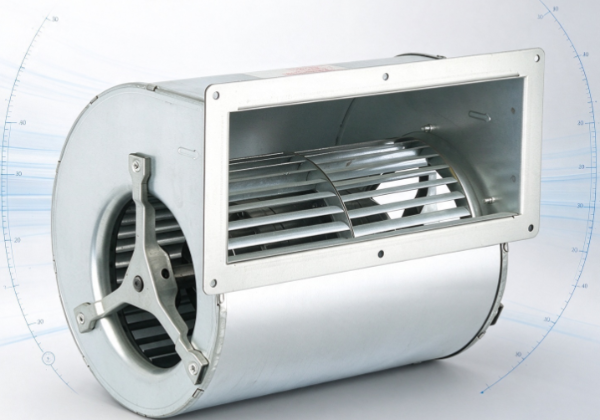
The fan has several moving and stationary parts. The motor turns an impeller, which pulls air through both inlets and throws it outward through the housing. Bearings support the rotating shaft, and the casing guides air to the outlet.
Each part adds to the overall sound. The motor creates some background noise. Air crossing the blades and moving through the housing makes more. Mounting structures and connected ducts can carry vibration to nearby surfaces.
A steady operating sound isn't necessarily a problem. Worry when the noise gets louder, changes character, appears suddenly, or comes with other odd behavior.
A low hum, for example, may be normal motor operation. A new hum with more vibration deserves attention. A brief rattle might be a loose panel, while repeated metallic contact may mean a rotating part is touching a stationary one.
Location gives clues too. Noise near the motor may suggest a motor or bearing issue. A whistle near an inlet may point to restricted airflow or air squeezing through a narrow gap. A sound that travels along the ductwork may start at the fan but get amplified by the system around it.
A double inlet design needs attention on both sides. If one inlet is blocked or gets air differently from the other, the flow becomes uneven. That can change the fan's sound and its operating behavior.
Learn what normal operation sounds like after installation and maintenance. Then any change is easier to spot and investigate.
Why Can Uneven Airflow Cause Unusual Noise?
Airflow is one of the main factors in a centrifugal fan's sound. When air enters smoothly, the fan runs close to its design conditions. When the incoming air is disturbed, the sound can turn inconsistent.
The fan draws air from both sides of the impeller. Ideally, the installation lets air reach each inlet without needless restriction. In practice, nearby walls, equipment, duct bends, filters, and other obstructions can interfere.
If one inlet is partly blocked, the air entering that side behaves differently from the other side. The uneven flow can cause turbulence and pressure changes around the impeller, producing a rushing, fluttering, or whistling sound.
Common causes of restricted or uneven airflow include:
- Dust and debris covering an inlet grille.
- Filters loaded with too much dirt.
- Objects placed too close to an air intake.
- Poorly arranged duct connections.
- Uneven clearances around the two inlets.
- Damaged or obstructed airflow passages.
A whistle often happens when air passes through a narrow opening or around an obstruction. It may get louder at higher speeds or when the system's airflow demand changes.
Fluttering can have a different origin. It may occur when airflow turns unstable or interacts with nearby parts. Loose flexible connections and thin panels can also move with changing air pressure and make a similar sound.
Inspect the air path first. Don't assume the impeller or motor is damaged. Check both inlets, the filters, and the connected ductwork. Follow the manufacturer's instructions for any cleaning or adjustment, and isolate the fan safely before you open anything.
Could Loose Components or Poor Installation Be the Cause?
A fan doesn't work alone. Its housing, mounting frame, fasteners, motor supports, and connected ducts all shape how vibration moves through the installation.
When these parts are secure, the system absorbs normal vibration without rattling or structural noise. When something loosens, even a small movement can make an audible sound.
A loose access panel can buzz against the housing. A poorly secured guard may rattle as the fan runs. Loose mounting bolts let the assembly shift slightly, and an under-supported duct can pass vibration into a wall or ceiling.
Installation conditions can add noise as well. If the fan isn't aligned with its ductwork, air may hit abrupt transitions or uneven clearances. Those conditions disturb the incoming air and create extra sound.
Check flexible connectors too. They isolate vibration between connected parts, but damaged, badly fitted, or poorly supported ones can flap or rub against nearby surfaces.
This table links common sounds to installation-related causes.
| Type of sound | Possible cause | What to inspect |
|---|---|---|
| Light rattling | Loose panels, guards, or fasteners | Housing covers and mounting points |
| Repeated knocking | A moving component making contact or a loose support | Rotating assembly clearances and structural supports |
| Low structural humming | Vibration transmitted through the mounting frame | Base, frame, and connected duct supports |
| Intermittent flapping | A flexible connector or thin panel moving with the airflow | Flexible joints and nearby sheet material |
| Buzzing near an electrical enclosure | Electrical components or vibration in the enclosure | Electrical equipment, inspected by a qualified person |
Treat these patterns as clues, not diagnoses. A rattle can come from a nearby duct instead of the fan. Structural humming may come from a motor, a mounting problem, or another vibration source.
Never tighten or adjust parts while the fan is running. Isolate it from power and secure it against unexpected startup before inspecting. Leave electrical checks and work on rotating parts to qualified personnel.
How Do Worn Bearings and Impeller Problems Affect Fan Noise?
The rotating assembly is central to fan operation. Its condition can change over time through normal wear, contamination, poor maintenance, mechanical damage, or unsuitable operating conditions.
Bearings support the shaft and keep it turning smoothly. As a bearing deteriorates, the fan may develop a rough grinding sound, a steady whine, or more vibration. The sound may shift as the equipment warms up or conditions change.
Noise alone doesn't prove a bearing has failed. Motor problems, poor alignment, and vibration from the supporting structure can produce similar symptoms. Only a proper inspection can tell them apart.
The impeller is another major noise source. Dust buildup can make its rotating mass uneven. A damaged blade changes how air moves through the fan and can cause vibration. Foreign objects in the housing may strike the impeller or lodge near moving parts.
An impeller that has worked loose on its shaft can produce repeated knocking or scraping. If a rotating part touches the casing, the noise may be sharp and metallic. Running on in that state can cause more damage.
Because the fan has two inlets, inspect both sides. Debris may build up unevenly, and a problem on one side may not show from the other.
During maintenance, trained personnel should look for visible contamination, damaged blades, loose connections, signs of rubbing, and changes in the rotating assembly's condition. Clean with methods suited to the equipment. Don't bend or alter components to try to cure vibration.
If the fan starts making a new grinding, scraping, or repeated impact sound, stop it and inspect it before returning to normal operation. Don't ignore a suspected bearing fault or damaged impeller just because the fan still moves air.
Can Motor or Electrical Problems Create Unusual Sounds?
The motor supplies the force that turns the impeller. Changes in its electrical or mechanical condition can alter the fan's sound and behavior.
A steady hum may be normal. A sudden rise in humming, buzzing, or whining can signal a change worth investigating. Possible causes include loose electrical connections, faulty motor components, an unsuitable power supply, or a fault in the motor's control equipment.
Motor noise can be hard to tell from bearing noise, since the two work together. A damaged bearing may make a high-pitched sound near the motor, and electrical issues can produce a similar whine or buzz.
The operating pattern adds information. If the noise appears at startup, changes with speed, or comes with irregular operation, look more closely at the motor and its controls.
Never open or adjust electrical components while the equipment is energized. Qualified technicians should handle checks on wiring, power supply, motor controls, or internal electrical parts, using the manufacturer's service procedures.
Consider the surrounding structure as well. A motor may produce normal vibration that sounds unusually loud because its mounting is loose or the frame resonates. Replacing the motor without checking the installation may not fix the real cause.
A good inspection treats the motor, bearings, mounting, and operating conditions as parts of one system. That avoids replacing components that are still in good shape.
Why Can Ductwork and Operating Conditions Change the Sound?
A centrifugal fan is part of an airflow network, and that network shapes how the equipment sounds. The fan may run quietly under one set of conditions and turn noisy when dampers move, filters clog, or the duct layout changes.
A restricted outlet can shift the fan's operating point. Too much resistance elsewhere in the system can also change the balance between airflow and pressure. Depending on the design and conditions, you might hear rushing, whistling, fluttering, or a low-frequency hum.
Duct geometry matters too. Abrupt bends, poorly fitted transitions, sharp edges, and sudden size changes disturb airflow. Nearby surfaces can amplify the noise or create resonance that makes the sound seem to come from somewhere else.
How the fan is controlled can also affect noise. A change in speed alters both the movement of the rotating assembly and the airflow sound. With a variable-speed controller, noise that shows up only at certain settings calls for a review of the control setup and the fan's operating range.
These practical checks can narrow down the source:
- Compare the sound under normal conditions with the sound when the problem occurs.
- Check whether the noise changes when a filter, damper, or other system component changes state.
- Inspect accessible duct connections for loose panels, damaged flexible joints, or signs of movement.
- Look for recent changes to the ventilation layout or nearby equipment.
- Check whether the sound travels through the building structure instead of coming directly from the fan.
Don't run unsafe experiments or operate outside the manufacturer's permitted conditions. If the fan shows severe vibration, mechanical contact, overheating, or electrical trouble, stop it and arrange an inspection.
Evaluate the fan together with its connected system. Replacing it may not solve a noise problem caused by a clogged filter, a poorly supported duct, or an unsuitable airflow path.
How Can Maintenance Teams Identify the Source of Unusual Noise?
A consistent inspection process cuts down guesswork. Instead of swapping parts based on sound alone, teams can gather observations and compare them with the equipment's normal behavior.
Start with a clear description of the problem. Record when the sound occurs, where it seems to come from, whether it's continuous or intermittent, and whether it began after maintenance, installation changes, or an operating adjustment.
Then check for related symptoms. Increased vibration, reduced airflow, irregular rotation, a burning smell, or unusual heat may mean the issue is more serious than a loose panel or minor airflow disturbance.
A practical inspection can follow these steps:
- Identify the sound pattern. Note whether it's rattling, grinding, humming, whistling, scraping, or knocking. Describe how the sound changes instead of just calling it "loud."
- Review the airflow path. Examine both inlets, accessible filters, grilles, and duct connections for restrictions or damage.
- Check the housing and supports. Look for loose panels, damaged mounts, worn connectors, or signs of contact between components.
- Inspect mechanical parts safely. With the fan isolated from power, qualified personnel can examine the impeller, shaft, bearings, and accessible internal components.
- Evaluate the motor and controls. If mechanical and airflow checks don't explain the noise, qualified technicians can assess the electrical system and motor operation.
- Compare findings with the equipment documentation. Use the manufacturer's maintenance guidance to decide whether a repair, adjustment, or further assessment is needed.
A maintenance log makes this process more effective over time. Recording changes in noise, vibration, airflow, and service history reveals recurring problems. It can also show whether an issue appeared after a particular repair or system change.
Not every unfamiliar sound signals a major fault. Moving air and rotating machinery naturally make noise. What matters is whether the sound has changed, whether other warning signs are present, and whether the fan still operates within its intended conditions.
When the cause stays unclear, a qualified technician can assess the fan and its ventilation network as a complete system. That finds the source of the noise while reducing the risk of needless repairs, or of running on with a developing fault.